The easiest way to determine which version of the Microsoft JET ADO access component (MDAC) installed is to check the registry under "HKEY_LOCAL_MACHINE,\Software\Microsoft\Jet\" . You should see a folder under this one that is named with version of the JET component, like 3.5 or 4.0.
It's also pretty easy to check \Windows\System32\msjet*.dll for a version, as suggested by this MS KB article : http://support.microsoft.com/kb/239114/.
More complicated is installing Microsoft's Component Checker - which I did and found to be overkill for my simple task. It lists the version with the DLL name.
To use Component Checker, select the top radio button labeled 'Perform analysis...'. Once you get the exact MDAC version select that version in the second radio button labeled ''Perform analysis against a selected version'. Apparently, 'odbcjt32.dll' is the ODBC connector in the MDAC so you can check it for a version.
It is interesting though, that this MS KB article suggests you check the \Windows\System32\msjet*.dll for a version, yet I could not find any msjet*.dll files listed in the component checker.
Showing posts with label technology. Show all posts
Showing posts with label technology. Show all posts
Monday, January 12, 2009


Wednesday, August 13, 2008
Time Warner DVR Software - Mystro
A couple of months ago Time Warner here in North Carolina replaced the DVR software that they had been using with a new system called 'Mystro'. I'll get to the point: Mystro sucks.
Mystro is buggy. There are so many bugs and quirks in this software that I can't begin to name them all. The system that was previously installed worked very well.
And when I tried calling tech support about it, they can't do any thing aside from reboot the box, of course. There is no way to directly report bugs about the software, you have to visit the website and submit a web email - which I've done three times and never had a single response. It's a black hole and no-one is listening. I'd like to submit specific bug reports as I find them and get some response that someone in the company is actually tracking the bug. How can the software be improved without a direct feedback loop from concerned customers?
I just sent them another web mail, we'll see if they answer. I'm quite sure that I will be looking into Satellite TV again here in the very near future.
Mystro is buggy. There are so many bugs and quirks in this software that I can't begin to name them all. The system that was previously installed worked very well.
And when I tried calling tech support about it, they can't do any thing aside from reboot the box, of course. There is no way to directly report bugs about the software, you have to visit the website and submit a web email - which I've done three times and never had a single response. It's a black hole and no-one is listening. I'd like to submit specific bug reports as I find them and get some response that someone in the company is actually tracking the bug. How can the software be improved without a direct feedback loop from concerned customers?
I just sent them another web mail, we'll see if they answer. I'm quite sure that I will be looking into Satellite TV again here in the very near future.
Thursday, August 23, 2007
Gmail Plus Addressing
Gmail has a really cool 'secret' feature which helps you sort mail and track spam-bastards: if your email is 'john.doe@gmail.com', you can send email to 'john.doe+anything@gmail.com' and it will end up in your account. How does this help? Well, let's say you visit, spamBastardFriend.com and want to sign up for a newsletter. If you give them your gmail address and you start getting spam then you can't tell who sold your address to the spam-bastards. But if you sign up for the newsletter as 'john.doe+spambastard@gmail.com' then when you start getting spam to that address, then you know who the culprit is! Then using gmail's rules you can just start trashing anything sent to that address. Using this feature, you have an unlimited supply of identifiable addresses.
The downside : many web sites simply have shoddy email validation functions that simply ignore the 1982 RFC822 spec which defines which addresses are valid. If you run into such a site, please feel free to email them and send them the link to the spec and ask them to fix their code. Also, I'm sure it's just a matter of time until spam-bastards simply start filtering all their gmail addresses to strip off the plus sign, but until then it's your friend and well worth using.
Gmail has a really cool 'secret' feature which helps you sort mail and track spam-bastards: if your email is 'john.doe@gmail.com', you can send email to 'john.doe+anything@gmail.com' and it will end up in your account. How does this help? Well, let's say you visit, spamBastardFriend.com and want to sign up for a newsletter. If you give them your gmail address and you start getting spam then you can't tell who sold your address to the spam-bastards. But if you sign up for the newsletter as 'john.doe+spambastard@gmail.com' then when you start getting spam to that address, then you know who the culprit is! Then using gmail's rules you can just start trashing anything sent to that address. Using this feature, you have an unlimited supply of identifiable addresses.
The downside : many web sites simply have shoddy email validation functions that simply ignore the 1982 RFC822 spec which defines which addresses are valid. If you run into such a site, please feel free to email them and send them the link to the spec and ask them to fix their code. Also, I'm sure it's just a matter of time until spam-bastards simply start filtering all their gmail addresses to strip off the plus sign, but until then it's your friend and well worth using.
Friday, June 29, 2007
Network Solutions Shady Marketing
I have stopped registering any new domains with Network Solutions. I used to have all my domains with them, but have moved all but one over to Godaddy.com. I like NetSol's web site and account interface much more than GoDaddy's, which is a nightmare of advertising and small links that I find annoying and confusing. But GoDaddy's service is sufficient and the prices are so much cheaper - we're talking less than 25% of NetSol's. NetSol has been the leading registrar since the rise of the internet, and they are capitalizing on that name recognition to keep prices high, but if you're like me and you maintain dozens of domains it's just not worth it, you have to go to a discount registrar.
As I said, I have one domain left with NetSol and I just got a letter informing that I have a domain due to expire in early July (it's the end of June now). I look at the domain and I'm beginning to start the transfer to GoDaddy and I realize that the expiration date is July 6, 2008. So, that domain isn't going to expire any time soon, but the marketing geniuses at NetSol figured (rightly) that if they send out expiration notices for domains 1 year in advance that many will overlook the year and just see the upcoming date and will renew. That's shady. So much for me being a 'Gold VIP' customer, eh?
I have stopped registering any new domains with Network Solutions. I used to have all my domains with them, but have moved all but one over to Godaddy.com. I like NetSol's web site and account interface much more than GoDaddy's, which is a nightmare of advertising and small links that I find annoying and confusing. But GoDaddy's service is sufficient and the prices are so much cheaper - we're talking less than 25% of NetSol's. NetSol has been the leading registrar since the rise of the internet, and they are capitalizing on that name recognition to keep prices high, but if you're like me and you maintain dozens of domains it's just not worth it, you have to go to a discount registrar.
As I said, I have one domain left with NetSol and I just got a letter informing that I have a domain due to expire in early July (it's the end of June now). I look at the domain and I'm beginning to start the transfer to GoDaddy and I realize that the expiration date is July 6, 2008. So, that domain isn't going to expire any time soon, but the marketing geniuses at NetSol figured (rightly) that if they send out expiration notices for domains 1 year in advance that many will overlook the year and just see the upcoming date and will renew. That's shady. So much for me being a 'Gold VIP' customer, eh?
Wednesday, June 13, 2007
Using iTunes as an ID3 Tag Editor
iTunes is a great application, but it can sometimes present you with a vexing problem: you drag an MP3 file into iTunes, it imports the song... but then you can't find it! You search by artist or album, but no luck. This can happen if the ID3 tag of the file is not set, because iTunes uses the ID3 tag to sort MP3 files. For example, if you have a file named 'The_Zutons_Who_killed_the_Zutons_02_Pressure_Point.mp3' without a proper ID3 tag, then once it is added to iTunes it ends up in the Unknown Artist folder and you can't find it in iTunes by artist, album or song name. One workaround to this is to get an ID3 tag editor and edit your files prior to adding them to iTunes (I've used ID3 Editor on OS X and MediaTagger on PC), but wouldn't it be better to be able to edit the ID3 tag directly in iTunes and skip the intermediate application?
Playlists to the Rescue!
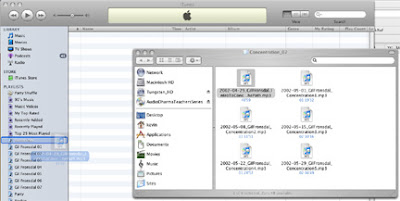
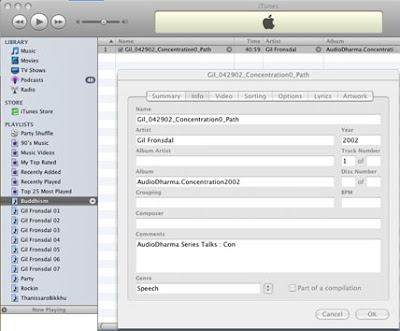
To get around this problem, when adding files that may not have the ID3 tag set up properly, do not just drag them onto the 'Music' icon where they can get lost. Instead, create a playlist and drag the the files into the playlist. The files will show up in the playlist regardless of the state of the ID3 tag, then you can just do 'Get Info' in iTunes to edit their ID3 tags.
OS X ScreenGrabs
Dragging an .mp3 file to a playlist
Editing the ID3 tag with Get Info
iTunes is a great application, but it can sometimes present you with a vexing problem: you drag an MP3 file into iTunes, it imports the song... but then you can't find it! You search by artist or album, but no luck. This can happen if the ID3 tag of the file is not set, because iTunes uses the ID3 tag to sort MP3 files. For example, if you have a file named 'The_Zutons_Who_killed_the_Zutons_02_Pressure_Point.mp3' without a proper ID3 tag, then once it is added to iTunes it ends up in the Unknown Artist folder and you can't find it in iTunes by artist, album or song name. One workaround to this is to get an ID3 tag editor and edit your files prior to adding them to iTunes (I've used ID3 Editor on OS X and MediaTagger on PC), but wouldn't it be better to be able to edit the ID3 tag directly in iTunes and skip the intermediate application?

Playlists to the Rescue!
To get around this problem, when adding files that may not have the ID3 tag set up properly, do not just drag them onto the 'Music' icon where they can get lost. Instead, create a playlist and drag the the files into the playlist. The files will show up in the playlist regardless of the state of the ID3 tag, then you can just do 'Get Info' in iTunes to edit their ID3 tags.
OS X ScreenGrabs
Dragging an .mp3 file to a playlist

Editing the ID3 tag with Get Info

Tuesday, May 15, 2007
BlueZone Terminal Emulation
Do you know how much money your company gives to Rumba, Attachmate and others each year for terminal emulation? One of the coolest terminal emulators on the planet is BlueZone. It's small, fast and easily replaces those more expensive terminal emulators for 3270, 5250, VT, UTS, and T27. Give it a try.
Do you know how much money your company gives to Rumba, Attachmate and others each year for terminal emulation? One of the coolest terminal emulators on the planet is BlueZone. It's small, fast and easily replaces those more expensive terminal emulators for 3270, 5250, VT, UTS, and T27. Give it a try.
Google Zeitgeist
This is a really cool way to look at the world : the Google Zeitgeist.
http://www.google.com/press/zeitgeist.html
This is a compilation of some of the top searches for a month, and it's amazing what those search terms will tell you about what was in our collective conscious during a certain month.
For example, in April of 2007 (the current year) 'Kurt Vonnegut' was a top search term. A quick Wikipedia search confirmed the worst : one of my literary influences is dead. Kurt, obviously I'm not the only one who loved you and cared enough to at least Google your image upon news of your death.
To the reader, I apologize for the creepy, morbid literary apostrophe!
This is a really cool way to look at the world : the Google Zeitgeist.
http://www.google.com/press/zeitgeist.html
This is a compilation of some of the top searches for a month, and it's amazing what those search terms will tell you about what was in our collective conscious during a certain month.
For example, in April of 2007 (the current year) 'Kurt Vonnegut' was a top search term. A quick Wikipedia search confirmed the worst : one of my literary influences is dead. Kurt, obviously I'm not the only one who loved you and cared enough to at least Google your image upon news of your death.
To the reader, I apologize for the creepy, morbid literary apostrophe!
Friday, March 16, 2007
Swing Bling
Simon Morris has a really cool little demo of Java WebStart Swing GUIs with some nice AJAXish alpha bling effects: http://weblogs.java.net/blog/javakiddy/archive/2007/02/swing_bling.html
Maybe Java can still compete with Flash... I know I'd much rather work in Java.
Simon Morris has a really cool little demo of Java WebStart Swing GUIs with some nice AJAXish alpha bling effects: http://weblogs.java.net/blog/javakiddy/archive/2007/02/swing_bling.html
Maybe Java can still compete with Flash... I know I'd much rather work in Java.
Thursday, March 15, 2007
Google Maps for OS X Address Book
I just installed Brian Toth's Google maps plugin on my new mac-mini and it's pretty cool. Now I can quickly view a map or directions for any address in my book. Thanks, Brian! :D
I just installed Brian Toth's Google maps plugin on my new mac-mini and it's pretty cool. Now I can quickly view a map or directions for any address in my book. Thanks, Brian! :D
Monday, March 12, 2007
Block Flash Ads with CSS
You can block flash ads with a custom Hosts file, and this is a pretty good option because it blocks ads from everywhere. I just found a cool way to block flash ads in Firefox with a little CSS tweak which blocks the ad until you click on it, that way you can choose to see a Flash ad or other Flash object if you want. Pretty cool! Thanks Jesse Ruderman :-)
http://www.squarefree.com/userstyles/xbl.html
You can block flash ads with a custom Hosts file, and this is a pretty good option because it blocks ads from everywhere. I just found a cool way to block flash ads in Firefox with a little CSS tweak which blocks the ad until you click on it, that way you can choose to see a Flash ad or other Flash object if you want. Pretty cool! Thanks Jesse Ruderman :-)
http://www.squarefree.com/userstyles/xbl.html
Monday, March 05, 2007
How much is your home worth?
Check out Zillow, this is a cool app that lets you see home valuations pretty much anywhere. Find out taxable values on homes and do comparisions to see recent sale values. It's a really nice way to get a feel for how much your home might bring on the market.
http://zillow.com
Check out Zillow, this is a cool app that lets you see home valuations pretty much anywhere. Find out taxable values on homes and do comparisions to see recent sale values. It's a really nice way to get a feel for how much your home might bring on the market.
http://zillow.com
Ever need to view an area by zip code?
I was recently doing a real-estate search, and sometimes it's more convenient to search an area by zip code if you have large city boundaries. For example, Raleigh is huge but I know I don't want to search for a house on the south-east side of Raleigh. I can search by zip code, but how do I know the zip code boundaries? Well here's a great Google maps mashup that'll do the trick:
http://maps.huge.info/zip.htm
I was recently doing a real-estate search, and sometimes it's more convenient to search an area by zip code if you have large city boundaries. For example, Raleigh is huge but I know I don't want to search for a house on the south-east side of Raleigh. I can search by zip code, but how do I know the zip code boundaries? Well here's a great Google maps mashup that'll do the trick:
http://maps.huge.info/zip.htm
LaLa.com Rocks!
http://lala.com
Do you have a bunch of old CDs? I do...
I have all of these CDs hanging around that I don't want. I keep all of my music digital these days, and I just update my iPod. I don't take CDs anywhere, I take my iPod.
But I don't really like iTunes. I think it's a great service, but I despise DRM (see my DRM post). Also, the encoding is lossy, so the music you download is sub-CD quality. I want to get my music on CD, I want the high quality and I don't want to fiddle with DRM.
The problem with used CD stores is that they're a rip-off. They buy CDs for a buck or two and resell them for $12. Even the used price of CDs is too high to feel good about buying, and the selling price is too low to feel good about selling. Have you ever shopped used CDs? You can spend hours rummaging through piles of CDs, in the cheap side of the record shop, feeling a bit like a dumpster-diving hobo, and still never find what you want.
Enter LaLa.com : trade your old CDs to someone else directly and skip the middle man. List what you have and what you want and start trading. The site has lot's of social networking goodness : users write album reviews and tag music, you can't link it to blogger and there are plugins to show what you're listening to.
Be sure to check out my LaLa! :-)
http://lala.com
Do you have a bunch of old CDs? I do...
I have all of these CDs hanging around that I don't want. I keep all of my music digital these days, and I just update my iPod. I don't take CDs anywhere, I take my iPod.
But I don't really like iTunes. I think it's a great service, but I despise DRM (see my DRM post). Also, the encoding is lossy, so the music you download is sub-CD quality. I want to get my music on CD, I want the high quality and I don't want to fiddle with DRM.
The problem with used CD stores is that they're a rip-off. They buy CDs for a buck or two and resell them for $12. Even the used price of CDs is too high to feel good about buying, and the selling price is too low to feel good about selling. Have you ever shopped used CDs? You can spend hours rummaging through piles of CDs, in the cheap side of the record shop, feeling a bit like a dumpster-diving hobo, and still never find what you want.
Enter LaLa.com : trade your old CDs to someone else directly and skip the middle man. List what you have and what you want and start trading. The site has lot's of social networking goodness : users write album reviews and tag music, you can't link it to blogger and there are plugins to show what you're listening to.
Be sure to check out my LaLa! :-)
DRM is DUM
The following links point to a great talk that succinctly explains why DRM just can't work. The basics is that digital content must be enciphered in order to be 'protected'. The way cryptography works is that you have a cryptographic algorithm, a cryptographic key and the enciphered data. This is fine in most cases because you have two parties who each have a secret key, sending enciphered data to one another, using a cryptographic algorithm that is commonly known to the attacker. The attacker can intercept the data, and knows the algorithm, but can't decrypt it because they don't have the key. With DRM, the attacker is also the recipient and ends up with the data, the cipher and the key. On a DVD, the data is stored encrypted, and the DVD player has the algorithm to decode the data... but where's the key? It's where it has to be... it's either on the disc or on the player. All DRM systems work this way, there is no way around it, and cryptography is useless if the attacker has the data, the algorithm and the key.
Video: Cory Doctorow's "DRM and MSFT: a product customer wants"
http://content.digitalwell.washington.edu/msr/external_release_talks_12_05_2005/11476/lecture.htm
Text Version : http://www.craphound.com/msftdrm.txt
The following links point to a great talk that succinctly explains why DRM just can't work. The basics is that digital content must be enciphered in order to be 'protected'. The way cryptography works is that you have a cryptographic algorithm, a cryptographic key and the enciphered data. This is fine in most cases because you have two parties who each have a secret key, sending enciphered data to one another, using a cryptographic algorithm that is commonly known to the attacker. The attacker can intercept the data, and knows the algorithm, but can't decrypt it because they don't have the key. With DRM, the attacker is also the recipient and ends up with the data, the cipher and the key. On a DVD, the data is stored encrypted, and the DVD player has the algorithm to decode the data... but where's the key? It's where it has to be... it's either on the disc or on the player. All DRM systems work this way, there is no way around it, and cryptography is useless if the attacker has the data, the algorithm and the key.
Video: Cory Doctorow's "DRM and MSFT: a product customer wants"
http://content.digitalwell.washington.edu/msr/external_release_talks_12_05_2005/11476/lecture.htm
Text Version : http://www.craphound.com/msftdrm.txt
Subscribe to:
Comments (Atom)